
Working with Content Objects
The purpose-built content management module of the Loyalty platform provides consistent handling of all marketing and program content for the following Loyalty asset types:
Collectively, these asset types are referred to as Content Objects, as they all make use of the platform’s built-in content management feature, called the Content Editor.
Note: The platform also provides a built-in editor for defining the content and appearance of Mobile Wallet Passes. However, this editor is unique only to Wallet Passes, and therefore Wallet Passes are not considered to be Content Objects.
The Content Editor is designed to consistently present Content Objects across multiple channels (such as mobile, email, and web), and across multiple presentation modes within a channel (such as carousel, wide rectangle, and mobile detail). The combination of channel and presentation mode is referred to as a Layout. A Layout defines the size and shape of the content, as well as the formatting and visual appearance of its interface elements. Effectively, a Layout is what the Member sees when viewing a Content Object in a specific context.
Layouts are defined and managed through an HTML document called a Template Set. Loyalty supports a default Template Set for each type of Content Object, but these default Template Sets can also be modified to meet your specific business requirements.
The Content Editor supports the concept of Master Content. Master Content is a mechanism to specify content elements that apply across all Layouts, making it easier to keep branding and messaging uniform in different contexts. Typically, Master Content is itself not displayed to Members; instead, it is a design tool to help build the desired content for different Layouts.
The Content Editor also supports multilingual content. Each language that your loyalty program supports utilizes its own Master Content and Layouts.
Marketers can also personalize content through the use of Content Tokens. A Content Token is a textual representation of a field in your Loyalty database, such as <first_name>. When the Content Object is presented to a Member, the platform populates the Content Token with the field value for that Member.
The following diagram provides an overall conceptual view of Loyalty’s content management system.
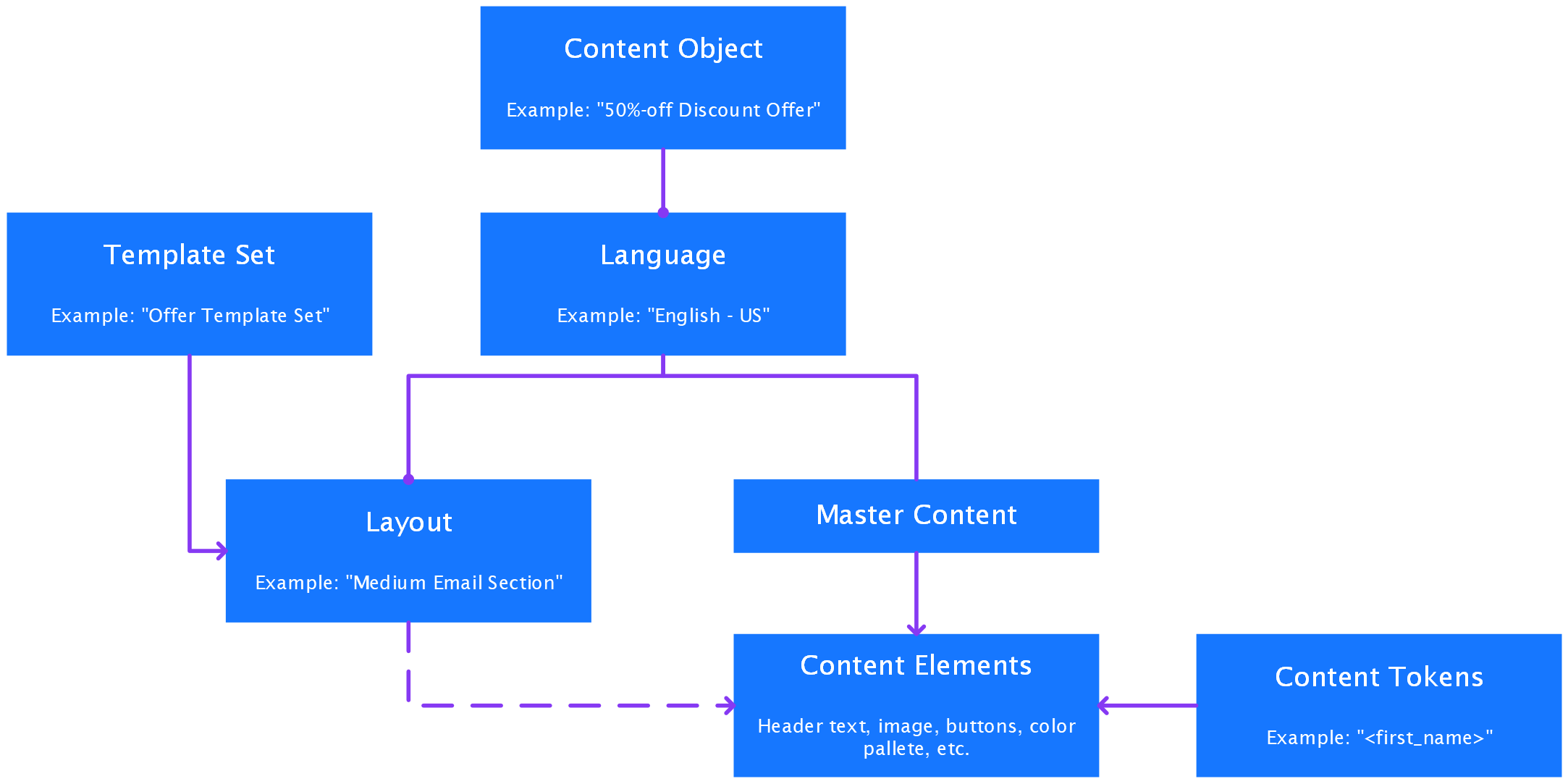
The above diagram represents the following relationships:
-
A single Content Object may reference one or more Languages.
-
Each Language may have one or more Layouts, as defined in the Template Set for the Content Object type.
-
Each Language has a special Layout called Master Content.
-
By default, content elements for a Layout are inherited from the Master Content.
-
Optionally, you can “override” the Master Content for a given Layout.
-
Content Tokens can be inserted into Layout text for personalization.
